Custom Corrugated Plastic (Signs)

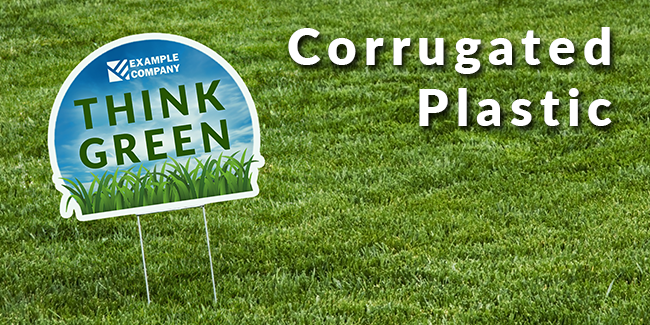
Digitally printed corrugated plastic offers a versatile and cost-effective solution for custom signage and unique shapes. Known for its lightweight yet durable structure, this material provides an ideal canvas for high-quality digital printing, allowing for vibrant, fade-resistant colors and crisp detail. The corrugated plastic is perfect for creating a variety of custom signs, from promotional displays to informational panels, and can be easily cut into any shape, offering endless possibilities for personalization and branding. Its weather-resistant properties make it suitable for both indoor and outdoor use, ensuring longevity and consistent visual appeal. Whether for business advertising, event signage, or creative installations, digitally printed corrugated plastic is an excellent choice for those seeking a flexible, reliable, and visually striking signage option.
Product Specs:
- Material: Sturdy 4mm corrugated plastic
- Size Options: Available in a comprehensive range of sizes, with the flexibility to accommodate custom dimensions for unique requirements.
- Sides: Options for printing on either one side for standard displays or both sides for maximum visibility.
- Finishing Options: Includes choices like grommets for easy hanging, scoring for folding, and custom contour cutting for unique shapes.
- Use: Ideal for promotional signage, informational boards, real estate signs, and trade show displays, offering a balance of practicality and visual appeal.
Templates
To start, select the product size, preview the design guidelines, download the guidelines for reference, and proceed with the customization options.
FAQs
- Build your file at the full finished size, at the same ratio as the product you ordered.
- Do not add crop marks or registration marks. They can change the art size and print on your product.
- Do not rotate the PDF page. Build the page in the orientation you want.
When a PDF has no cut line, we trim to the PDF art box. A wrong art box means a wrong crop.
- 100 to 300 ppi at full size.
- Very large banners can go as low as 60 ppi.
Enlarging a low resolution image does not add detail. Start from the original, larger image.
- We accept PDF, JPEG and TIFF.
- PDF is required for cut lines, kiss cuts, creases and white ink.
- Word, PowerPoint, Publisher and Canva share links are not accepted. Export a PDF instead.
The upload limit is 150 MB. For a larger file, contact us and we will send instructions to send it by WeTransfer or Dropbox.
- On the product page, choose Same as Front or upload a separate back file.
- Name the files clearly, for example JobName_FRONT.pdf and JobName_BACK.pdf.
- Build both sides at the same full size and the same orientation.
- Build the back reading correctly. Do not mirror it. We handle the flip in production.
- Send PDFs with proper bleed on both sides. This is highly recommended.
- For shaped signs, put the CutContour line on the front file only.
- For banners, keep important art away from the hem and grommet area on both sides.
A cut line is a vector line in your PDF that tells our cutter where to cut. You need one for any custom shape. Without a cut line, we cut a rectangle at the art box size.
- Cut contour (cuts all the way through): spot color CutContour, 100% Magenta (0, 100, 0, 0).
- Kiss cut (cuts the vinyl, not the backing): spot color Kiss, 100% Yellow (0, 0, 100, 0).
- Crease (makes a fold line): spot color Crease, 100% Cyan (100, 0, 0, 0).
Setup in Adobe Illustrator:
- Make a new layer named CutContour.
- On that layer, draw the cut line with the Pen tool or a Shape tool.
- In the Swatches panel, click New Swatch.
- Name the swatch CutContour. Set Color Type to Spot Color.
- Set the color to 100% Magenta.
- Apply the swatch to the stroke of the path. Set the fill to None.
- Save as PDF with layers and spot colors kept.
For a kiss cut or a crease, do the same steps with the layer name and spot color above. CorelDRAW works the same way.
Rules:
- Spell each spot color name exactly as shown. Capital letters count.
- The line must be vector, one continuous path, with no breaks and no stacked duplicates.
- Stroke only, no fill. Each line type on its own layer.
- Extend your color past the cut line (bleed) so no white edge shows.
- Avoid very small inside corners, thin points and tiny holes. They can tear or lift.
- Set the trim box and the art box to the finished size.
- Set the bleed box to the finished size plus the bleed on every side. Use at least 0.125 in of bleed. 0.25 in is fine too.
- In Illustrator or InDesign, set the bleed in the document setup, then export the PDF with "Use Document Bleed Settings" on.
Bleed is color that extends past the finished edge or past the cut line, so no white edge shows after cutting. It depends on your file:
- Flat image (JPEG, TIFF, or a PDF with only an image and no cut line): no bleed. This is a requirement. Make the image the exact finished size. We print the whole image, so any bleed prints on your product.
- PDF with a cut line: bleed is very highly recommended. Extend the color at least 0.125 in past the cut line. 0.25 in is fine too.
- Double sided PDF: bleed is highly recommended on both sides.
- PDF for a rectangle or a banner: bleed is not required, but it is recommended, with the bleed box set correctly.
Reprints caused by bleed in a flat image are at your expense.
You choose your production time on the product page. Not every option is available on every product, and the price for each option shows on the product page.
- Same Day: ready the same business day if confirmed by 10:00 AM CT. After 10:00 AM CT, ready by 11:00 AM the next business day. Example: confirmed 9 AM Monday, ready by 4 PM Monday.
- 24 Hour: ready about 24 business hours after confirmation. Example: confirmed 9 AM Monday, ready 9 AM Tuesday. Confirmed 3 PM Friday, ready 3 PM Monday.
- 48 Hour: our standard for jobs that need routing or other hand finishing. Example: confirmed 9 AM Monday, ready 9 AM Wednesday.
- 72 Hour: best for complex projects. Example: confirmed 9 AM Monday, ready 9 AM Thursday.
- Variable Lead: only on materials that are low in stock or special order. We will give you a ready date.
Large quantities may need more time. We will tell you before we start if they do.
The Same Day cutoff is 10:00 AM Central Time, Monday through Friday. Your order must be paid, have print-ready artwork and have an approved proof (if it has one) by 10:00 AM CT to be ready the same day.
Shipping time is the time the carrier needs to deliver your order after it leaves our shop. It starts on the ship day, not the day you order.
Orders ready by 4:00 PM CT ship the same business day. We email you a tracking number when your order ships.
Production time is the time we need to print, finish and pack your order. It does not include shipping.
Production time starts when we confirm your order. We confirm it when:
- Your order is placed and paid.
- Your print-ready artwork is uploaded.
- Your proof is approved (if your order has a proof).
Orders placed after business hours count as 9:00 AM the next business day. Business days are Monday through Friday. Weekends and major holidays do not count.
Production time + ship day + carrier transit = delivery date
Example: you choose 24 Hour production, and we confirm your order at 9:00 AM CT on Monday. It is ready at 9:00 AM Tuesday and ships Tuesday. FedEx Ground to a 3 day zone delivers Friday.
Yes. Choose a faster production option on the product page, and a faster shipping service at checkout. Both cost more. If your date is firm, call us before you order.
After you choose your options, upload your artwork. Follow the guidelines next to the upload form, and see our Artwork Requirements FAQs.
Orders with missing or unacceptable artwork are put on hold, which delays production.
The flutes (the hollow channels inside the corrugated plastic) run vertically, from the top of the sign to the bottom. This is so that the wire H-stake slides up into the flutes and holds the sign.
If you need the flutes to run horizontally, for example for a sign that hangs from a frame or has no stake, tell us in the order notes before we print.
Place your order within
Ready for Pick Up or Ships on